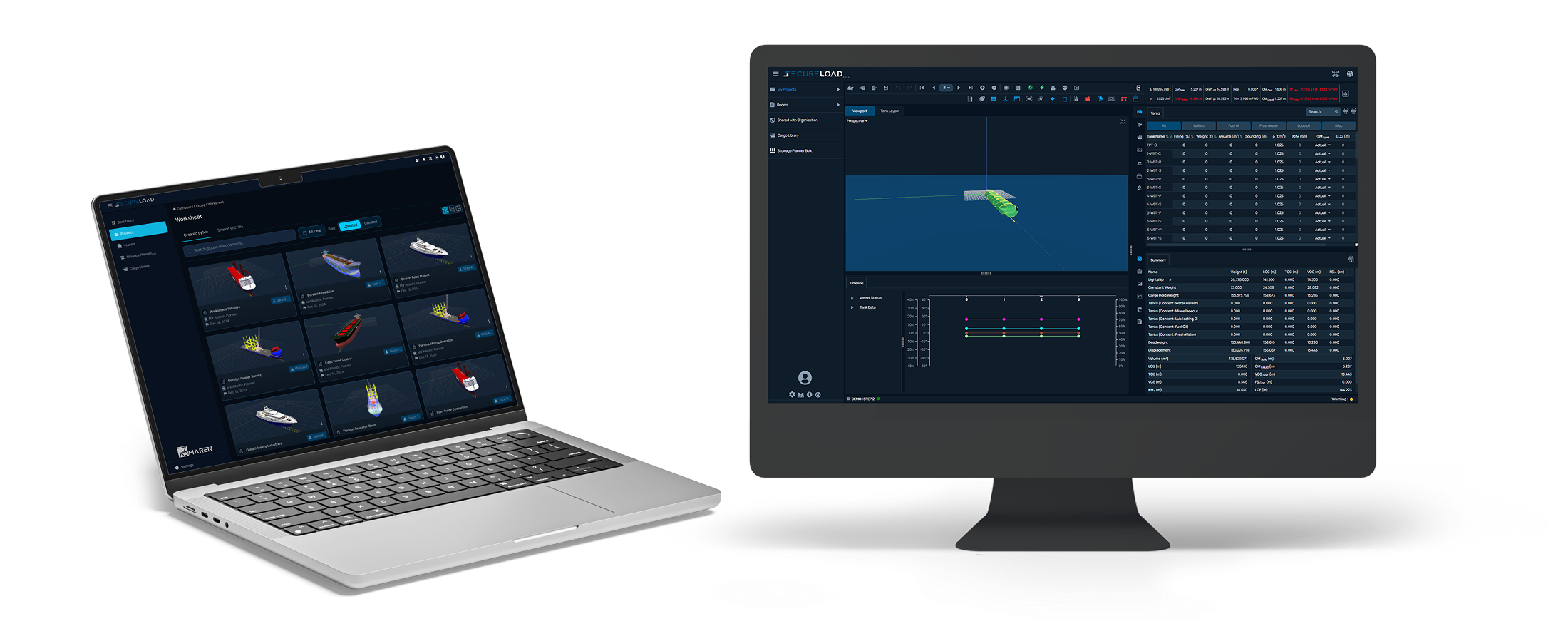
Replace standalone desktop installations with a single cloud platform. One database, one ship model, Real-time collaboration accessible from any browser. With Fleet Connect, the same data used onboard synchronizes to shore, making the cloud version the connected hub for every department and every SecureLoad application.
The Problem
Shore teams use a locally installed copy of the loading computer on whatever PC they need. Everyone works individually their own copy, their own data, their own results. There is no shared database. Two people analysing the same vessel may be working on completely different versions of the ship model.
When every installation is standalone, there is no master record. Cargo libraries, loading templates and stability results live on individual machines. If one person updates a plan, nobody else sees it. There is no way to know which version is current or correct.
Plans created in the office can't reach the vessel automatically. The crew re-enters data manually into the onboard system. There is no synchronization, no guarantee that what was planned ashore matches what is executed onboard.
With each copy running independently, there's no way to see loading conditions across the fleet from one place. Management, chartering and operations teams have no centralised view. Every vessel and every user is a data silo.
The Solution
Loading Computer Shore replaces standalone desktop installations with a single cloud platform that the entire company shares. One database, one ship model, one version of the truth accessible from any browser. When the port captain, the charterer and the operations team open the same vessel, they see the same data and work on the same plan.
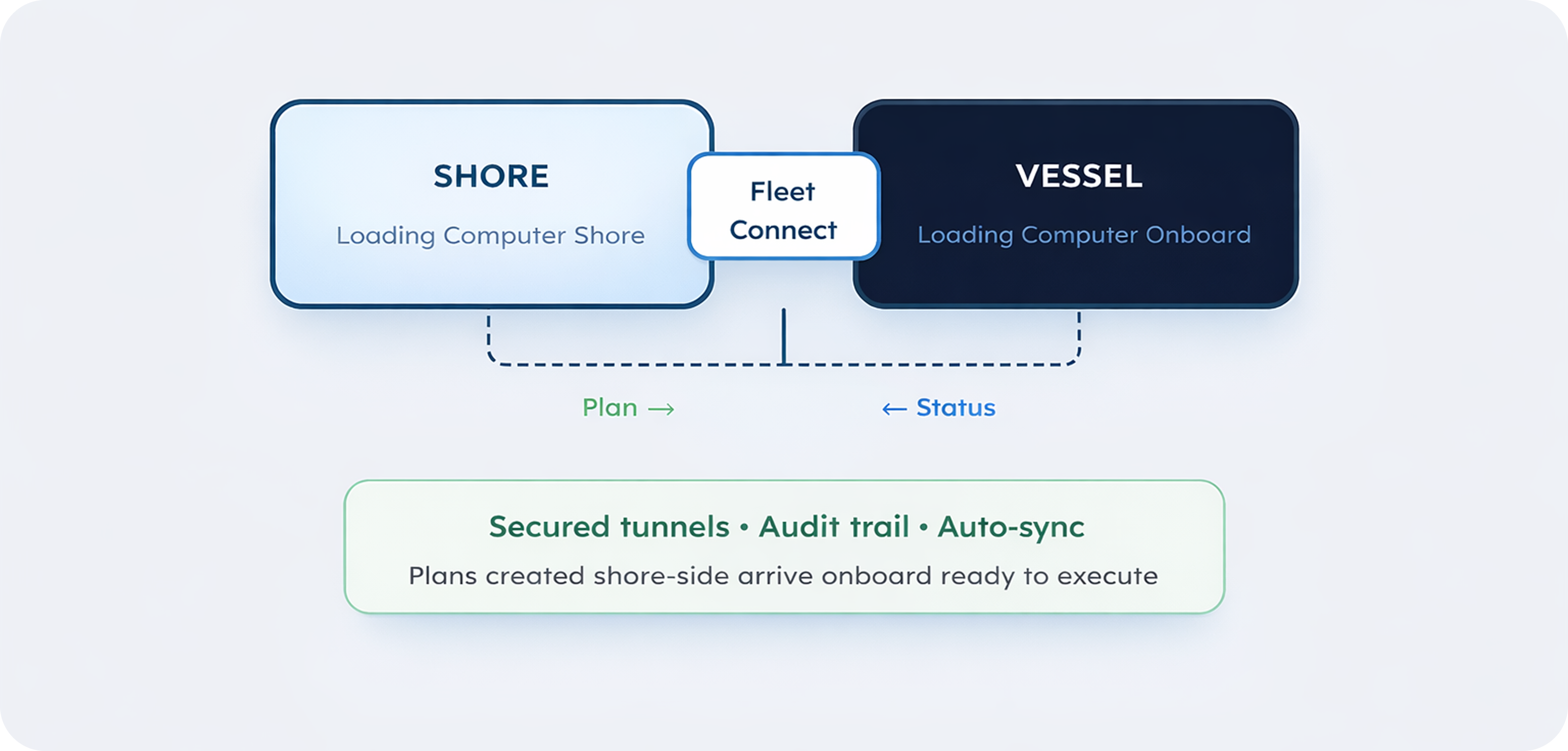
With Fleet Connect, the cloud becomes the bridge between shore and vessel. Plans created ashore synchronize directly to the onboard loading computer. The same data used onboard is now available to every department ashore.
Because the cloud version is the single connected hub, it becomes the foundation for everything else — every other application in the SecureLoad ecosystem connects to it, giving everyone in the company access to solutions built on the same live data.
Under the hood
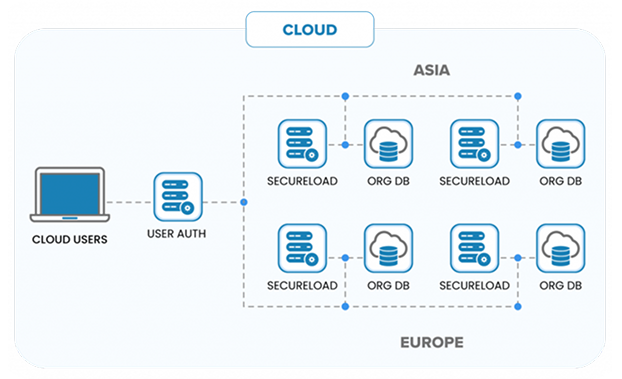
Loading Computer Shore runs on AWS with multi-region redundancy. Each organization gets a dedicated company domain (company.secureload.com) with customer-selected data residency Asia, Europe, or US. The platform is Linux-based, built for stability, reliability and security. Users access it from any modern browser no installation, no VPN, no desktop software.
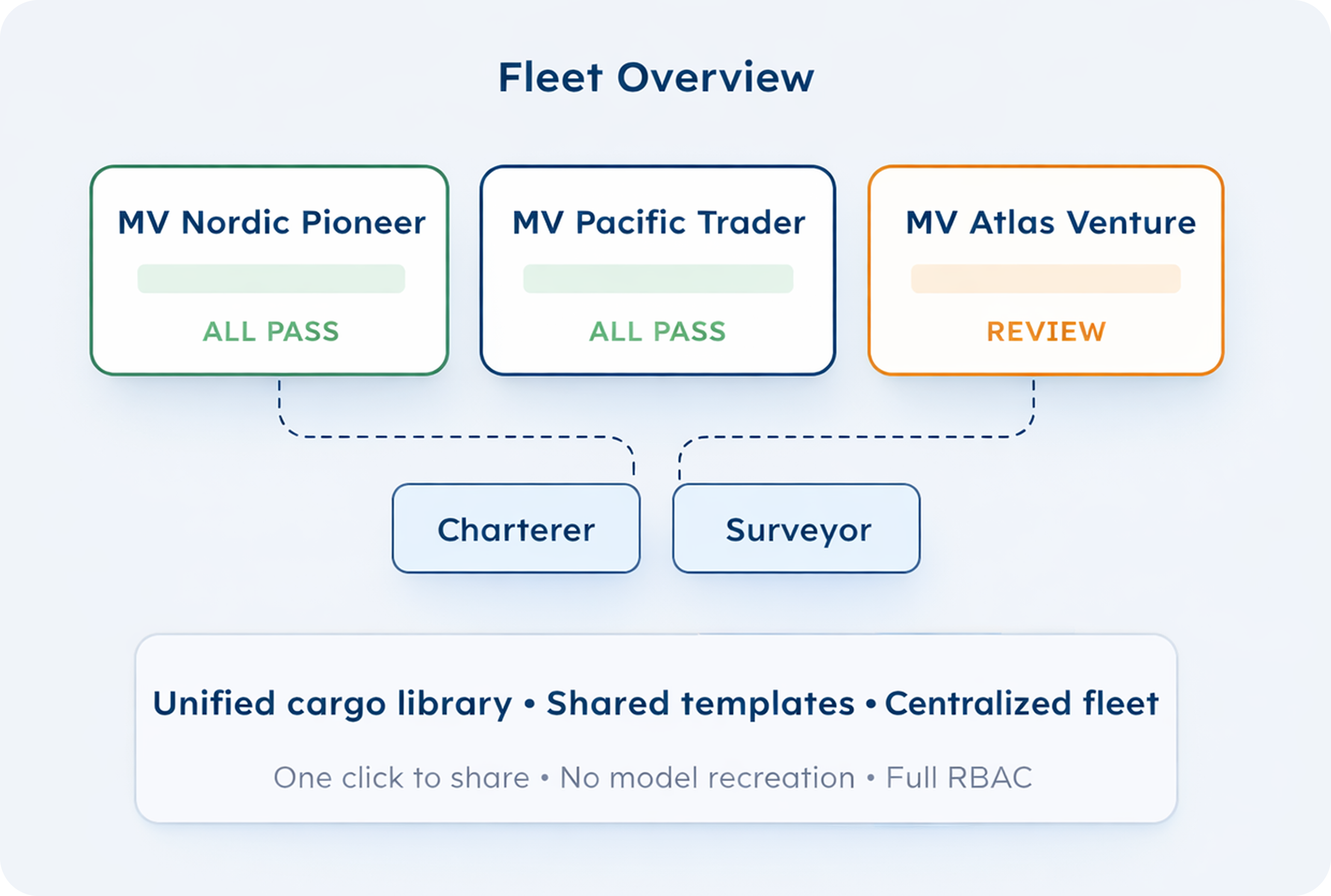
Every vessel in your fleet is accessible from one platform. Select a vessel, open its loading computer, create or modify conditions and verify stability, strength and drafts. Share access with charterers, surveyors, or consultancies with a single click — no need to recreate ship models or arrange separate licences. They work on your vessel's actual data, under your access controls.
Plans created in Loading Computer Shore synchronize directly to the onboard Loading Computer through Fleet Connect. The crew receives the approved plan ready to execute. Changes made onboard sync back. Secured, authenticated tunnels ensure data integrity during transfer. Full activity logs and audit trails are maintained for every action across both shore and vessel systems.
Deployment

Calculates intact stability and longitudinal strength for defined loading conditions. Results are checked against regulatory criteria and presented as curves, limits, and numerical outputs in compliance-ready reports.

Determines optimal tank filling levels to achieve the target loading condition. Uses iterative optimization within operational constraints like tank-usage restrictions and filling limits keeping solutions practical onboard.

Recommends the optimal trim for a given loading condition within stability limits, and identifies the ballast adjustments required to reach it improving efficiency without compromising compliance.

Integrates live tank-level data into the loading computer via standard MODBUS communication, so the vessel's loading condition updates in real time during operations.

Interfaces with ballast automation systems to execute computed loading plans directly. Powered by Hoppe Marine GmbH, it enables controlled, automated ballast water transfer linking calculation to execution.

Performs stability and strength assessments for defined damage cases using direct calculation. Results are verified against regulatory requirements and supported by detailed assessment reports for operational and approval use.

Loads and distributes unitized cargo across holds and deck areas. Configurable hatch covers, tween decks, and internal bulkheads represent the vessel’s operational arrangement with predefined and custom configurations for vessel-specific layouts.

Loads dry bulk and grain cargoes across configurable holds. Evaluates conditions against grain and bulk stability requirements ensuring compliance with relevant grain codes and regulatory limits while accounting for distribution across holds.

Container positioning and stowage planning with 3D and 2D visualization. Supports efficient placement across designated positions and BAPLIE data exchange for seamless integration with container planning workflows.

Integrates DNV’s StowLash solver directly into the SecureLoad workflow. Class-approved lashing calculations sit alongside loading, stability, and operational planning no external tools required.

Simulates single and tandem crane operations with manual or geometry-derived crane positioning. Verifies stability and longitudinal strength at each lifting stage and checks for collisions between cargo, cranes, and vessel structures.

Supports jack-up vessel operations through interactive 3D visualization and a dedicated leg-load distribution solver. Provides insight into load transfer during jacking and verifies conditions across operational scenarios.
Calculates and simulates float-in and float-off operations for floating docks and semi-submersible vessels. Automatically computes draft, required ballast, pump capacities, stability, and strength across all stages supporting complex submersion and refloa...

Supports continuous loading and discharge operations with calculations for varying tides, moving cargo, ballast transfer, and pump capacity. Evaluates stall conditions including tide-compensated SPMT failure scenarios and generates detailed ballast sheets...

Accurate cargo volume and ullage reporting for tanker operations. Applies temperature-dependent density and volume corrections per ASTM and API tables for precise measurement and reporting.

Share your loading computer with charterers and consultancies with a single click no need to recreate ship models. Manage your entire fleet from a single platform with accurate, up-to-date information always accessible.

Verify cargo loadability prior to fixing, without needing to consult the crew or possess extensive ballast knowledge. Run feasibility checks using the same calculation engine and data that the vessel uses onboard.

Create loading plans from the office and push them directly to the vessel. Review conditions for any vessel in the fleet, approve plans and track execution all from one browser-based platform.
Access the full calculation engine for hydrostatic analysis, stability verification and structural checks from the office. Work on vessel models directly without needing onboard access or separate software.

Get visibility into fleet loading conditions without technical expertise. Run quick feasibility checks, compare loading scenarios across vessels and make informed commercial decisions faster.

Receive loading plans from the shore office directly into the onboard system via Fleet Connect. Sync with office calculations while in port. No manual re-entry of data plans arrive ready to execute.